Code này có bản quyền, nếu có nhu cầu sử dụng, bạn hãy
click để tìm bản gốc có trả phí
[SVG] Messengers - Thêm trình tin nhắn cho XenForo 2 2.1.10
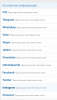
Add-on hỗ trợ thêm biểu tượng của trình nhắn tin và mạng xã hội với thông tin trong bài viết của XenForo 2.

Đầu tiên, tạo các trường người dùng bổ sung:
ICQ

Không cần thiết phải làm tất cả các lĩnh vực, bài viết đã chỉ ra tất cả những gì có thể được thực hiện.
Chúc các bạn thành công.
Add-on hỗ trợ thêm biểu tượng của trình nhắn tin và mạng xã hội với thông tin trong bài viết của XenForo 2.
ICQ
- Field ID: icq
- Header: ICQ
- Description: ICQ number.
- Display Location: Contact Information
- Display Order: choose by yourself, for example there is my screenshot.
- Field type: Single-line text field
- Requirements for value matching: None
- Basic settings: Do not put "Apparently in the user information block in messages"
- Field ID: telegram
- Title: Telegram
- Description: Nickname in Telegram starting @.
- Place of display: Contact information
- Display order: choose for yourself, for example, there is my screenshot.
- Field type: Single-line text field
- Requirements for matching values: Regular expression
Mã:
^[a-zA-Z0-9-_.,@:]+$ - Basic settings: Do not put "Apparently in the user information block in the messages"
- field ID: whatsapp
- Header: WhatsApp
- Description: Phone number without a space.
- Display Location: Contact Information
- Display Order: choose by yourself, for example there is my screenshot.
- Field type: Single-line text field
- Requirements for matching values: Regular expression
Mã:
^\+?\d{1,3}?[- .]?\(?(?:\d{2,3})\)?[- .]?\d\d\d[- .]?\d\d\d\d$ - Basic settings: Do not put "Apparently in the user information block in the messages"
- Field ID: viber
- Title: Viber
- Description: The phone number without a space.
- Display Location: Contact Information
- Display Order: choose by yourself, for example there is my screenshot.
- Field type: Single-line text field
- Requirements for matching values: Regular expression
Mã:
^\+?\d{1,3}?[- .]?\(?(?:\d{2,3})\)?[- .]?\d\d\d[- .]?\d\d\d\d$ - Basic settings: Do not put "Apparently in the user information block in the messages"
- ID fields: skype
- Title: Skype
- Description: Nickname in Skype.
- Display Location: Contact Information
- Display Order: choose by yourself, for example there is my screenshot.
- Field type: Single-line text field
- Requirements for matching values: Regular expression
Mã:
^[a-zA-Z0-9-_.,@:]+$ - Basic settings: Do not put "Apparently in the user information block in the messages"
- Field ID: vk
- Title: Vkontakte
- Description: The page address.
- Display Location: Contact Information
- Display Order: choose by yourself, for example there is my screenshot.
- Field type: Single-line text field
- Requirements for value matching: Reference
- Basic settings: Do not put "Visibly in the user information block in the messages"
- Field ID: ok
- Title: Odnoklassniki
- The rest is similar to Vkontakte.
- Field ID: facebook
- Caption: Facebook
- The rest is similar to Vkontakte.
- Field ID: twitter
- Title: Twitter
- The rest is similar to Vkontakte.
- Field ID: instagram
- Title: Instagram
- The rest is similar to Vkontakte.
- Field ID: pinterest
- Title: Pinterest
- The rest is similar to Vkontakte.
Không cần thiết phải làm tất cả các lĩnh vực, bài viết đã chỉ ra tất cả những gì có thể được thực hiện.
Nguồn: Internet
Bài viết liên quan
![ADDON [VNXF 2x] More Threads - PHIÊN BẢN XENFORO v2.2.16](https://i.imgur.com/Ls4jCmF.jpg)
![[VNXF] Follow Suggestion - Widget gợi ý theo dõi dạng Tinder cho XenForo 2.3 1.2.4](https://i0.wp.com/vnxf.vn/attachments/vnxf-follow-suggestion-png.100246/?resize=300%2C225&quality=100&strip=all)
![[VNXF] Content Rating & Reviews — Hệ thống đánh giá & nhận xét nội dung cho XenForo 2.3 1.0.5](https://i0.wp.com/vnxf.vn/attachments/vnxf-content-rating-reviews-png.100184/?resize=300%2C225&quality=100&strip=all)
![[VNXF] Post Comment v1.2.0 - Hệ thống bình luận đa cấp (Threaded Replies) cho XenForo 2.3 1.2.5](https://i0.wp.com/vnxf.vn/attachments/vnxf-postcomment-jpg.100167/?resize=300%2C225&quality=100&strip=all)
![[VNXF] Floating Contact - Nút liên hệ nổi đa kênh kết nối khách truy cập với bạn chỉ trong một cú nhấp cho XenForo 2.3 1.2.1](https://i0.wp.com/vnxf.vn/attachments/vnxf-floatingcontact-jpg.100145/?resize=300%2C225&quality=100&strip=all)
![[VNXF] Content Protection - Giải pháp bảo vệ bản quyền nội dung toàn diện cho XenForo 2.3 1.0.0](https://i0.wp.com/vnxf.vn/attachments/vnxf-contentprotection-png.100116/?resize=300%2C225&quality=100&strip=all)

![[VNXF] Stories - Thêm Story cho XenForo 2.3](https://cdn.vnxf.vn/data/assets/logo_default/stories.jpg)
![[VNXF] Theme Digital – Sự lựa chọn hoàn hảo cho diễn đàn công nghệ hiện đại](https://cdn.vnxf.vn/data/assets/logo_default/theme-digital.png)
![[VNXF] Auto Attach Images - Create Attachments from External Links 1.5.0](https://cdn.vnxf.vn/data/assets/logo_default/VNXFAutoAttachImages.png)